Introduction
In the realm of modern web development, performance and scalability are critical factors. Asynchronous programming is a powerful approach that can significantly enhance the performance of web applications by enabling them to handle multiple tasks concurrently. FastAPI, a high-performance web framework for Python, offers excellent support for asynchronous programming, making it a popular choice for developers aiming to build efficient and scalable APIs.
Previously, I wrote a tutorial titled Building a TODO API with FastAPI and SQLAlchemy: A Step-by-Step Guide, which focused on creating a synchronous API. The response was overwhelmingly positive, and many readers requested an asynchronous version to take full advantage of FastAPI's capabilities.
In this tutorial, we will explore how to build a TODO API using FastAPI and SQLAlchemy, focusing on asynchronous operations. Our goal is to leverage the asynchronous capabilities of FastAPI to create an API that performs well and adheres to best practices for modern web development. By the end of this guide, you will have a solid understanding of implementing asynchronous endpoints, interacting with a database asynchronously using SQLAlchemy, and ensuring that your application is responsive and efficient.
We'll cover the following key topics:
1. Setting up the project environment
2. Installing necessary dependencies
3. Configuring the FastAPI application
4. Setting up the database with SQLAlchemy
5. Creating asynchronous CRUD operations
6. Testing the asynchronous API
Step by step, let's build a high-performance TODO API with FastAPI and SQLAlchemy Asynchronously!
Prerequisites
Before we embark on building our TODO API with FastAPI, ensure that you have the following prerequisites installed on your system:
- Python 3.7 or later: FastAPI requires Python 3.7 or a higher version. You can download Python from the official Python website.
- pip (Python package installer): Ensure that you have pip installed, as it will be used to install FastAPI and other dependencies.
Project Setup
Create a Project Directory:
Open your terminal and create a new directory for your FastAPI project:
mkdir fastapi_todo_async
cd fastapi_todo_async
Set Up a Virtual Environment:
Inside your project directory, create a virtual environment. This step is essential for isolating your project's dependencies.
python -m venv venvActivate the Virtual Environment:
Activate the virtual environment based on your operating system:
- On Windows:
venv\Scripts\activate- On macOS and Linux:
source venv/bin/activateInstall FastAPI and Uvicorn:
- FastAPI:
FastAPI is a modern, fast, web framework for building APIs with Python 3.7+ based on standard Python type hints. It is designed to be easy to use and to provide high performance, making it an excellent choice for API development.
pip install fastapiThis command instructs `pip` to download and install the FastAPI package along with its dependencies. Once installed, we can leverage the features of FastAPI to create robust APIs.
- Uvicorn:
Uvicorn is an ASGI (Asynchronous Server Gateway Interface) server that serves as a lightning-fast ASGI server implementation, ideal for running FastAPI applications.
pip install uvicornInstalling Uvicorn ensures that we have a high-performance server to run our FastAPI application. Uvicorn can handle asynchronous requests efficiently, aligning with FastAPI's capabilities for handling asynchronous operations.
- Pydantic:
Pydantic is a data validation and settings management library for Python. It's widely used with frameworks like FastAPI to define and validate data models.
Here are key features of Pydantic:
- Data Validation: Pydantic allows you to define data models using Python type hints. It automatically validates input data against these models, ensuring that it adheres to the specified structure and data types.
- Settings Management: Pydantic extends beyond validation and is also used for managing application settings. You can define a Pydantic model to represent your application's configuration, making it easy to load settings from environment variables, files, or other sources.
- FastAPI Integration: Pydantic plays a central role in FastAPI by providing automatic request and response validation. In FastAPI, Pydantic models are used to define the structure of incoming request data and outgoing response data. This integration promotes clean, type-safe code.
- Type Checking: Pydantic leverages Python's type hinting system. This not only serves for documentation purposes but also enables static type checking tools to catch potential issues early in development.
- Conciseness and Readability: Pydantic models are concise and readable, making it easy to understand the expected structure of data. This simplicity enhances code maintainability and collaboration.
pip install pydantic pydantic-settingsBy running these pip commands inside the virtual environment, we isolate the dependencies for our FastAPI project. This practice ensures that the project's dependencies do not interfere with other Python projects on your system. With FastAPI and Uvicorn installed, we are ready to start building our TODO API using the strengths of FastAPI's asynchronous framework.
Project Folder Structure
Now that we have set up the essential database configuration, let's organize our FastAPI project with a clear folder structure. A well-structured project helps in maintaining code readability, scalability, and ease of collaboration. Below is the proposed folder structure:
.
├── .env
├── .git
├── .gitignore
├── LICENSE
├── README.md
├── app
│   ├── __init__.py
│   ├── api
│   │   ├── __init__.py
│   │   └── v1
│   │       ├── __init__.py
│   │       └── todos
│   │           ├── __init__.py
│   │           ├── create.py
│   │           ├── delete.py
│   │           ├── read.py
│   │           └── update.py
│   ├── core
│   │   ├── __init__.py
│   │   └── config.py
│   ├── database
│   │   └── __init__.py
│   ├── main.py
│   ├── models
│   │   └── __init__.py
│   ├── crud
│   │   └── __init__.py
│   ├── schemas
│   │   └── __init__.py
│   └── tests
│       └── __init__.py
└── requirements.txt
The folder structure indicates a FastAPI project with a modular and organized design. Let's break down each component:
- .env: This file typically contains environment variables, configuration settings, or secrets for your application. It's often used with a library like `python-dotenv` to load these variables into your application.
- .git: This folder contains all the necessary files for Git version control. It tracks changes to your codebase, facilitates collaboration, and allows you to revert to previous versions if needed.
- .gitignore: This file lists files and directories that should be ignored by Git. Commonly, it includes files like temporary files, logs, and virtual environment directories.
- LICENSE: This file contains the license information for your project, indicating how others can use, modify, and distribute your code.
- README.md: This is typically the main documentation file for your project. It provides an overview, installation instructions, and other relevant information for developers or users.
- app: This is the main folder containing your FastAPI application. o
- __init__.py: This file makes the `app` folder a Python package.
- api: This folder holds the API-related modules. o
- __init__.py: Makes the `api` folder a Python package.
- v1: Indicates an API version. It might contain various API versions as your project evolves. o
- __init__.py: Makes the `v1` folder a Python package.
- todos: Represents a specific API endpoint related to todos. o
- __init__.py: Makes the `todos` folder a Python package.
- create.py, delete.py, read.py, update.py: These files likely contain the CRUD (Create, Read, Update, Delete) operations for the todos API endpoint.
- core: This folder holds core configurations and settings for your application. o
- __init__.py: Makes the `core` folder a Python package.
- config.py: Contains configuration settings for your FastAPI app, such as database configurations or API settings.
- database: This folder could be used to store database-related files or configurations. o
- __init__.py: Makes the `database` folder a Python package.
- main.py: The entry point of your FastAPI application. It typically contains the FastAPI app instance and other setup.
- models: Contains data models for your application.
- crud: Contains crud operations for your application.
- schemas: Contains Pydantic schemas used for data validation.
- tests: For storing your test files.
- requirements.txt: Lists the Python packages and their versions required for your project. This file is often used with `pip` to install dependencies.
This structure promotes modular design, making it easier to organize, maintain, and extend your FastAPI application. Each component has a specific responsibility, contributing to the overall organization and readability of your codebase.
Deploy MySQL Database with Docker
Before we dive into building our FastAPI application, let's set up a MySQL database using Docker. This will provide us with a convenient and isolated environment for development.
docker run --name fastapi_todo_async -d \
    -p 3306:3306 \
    -e MYSQL_ROOT_PASSWORD=fastapi_todo_async \
    -e MYSQL_USER=fastapi_todo_async \
    -e MYSQL_PASSWORD=fastapi_todo_async \
    -e MYSQL_DATABASE=fastapi_todo_async \
    mysql:latest
Explanation of the options:
- `--name fastapi_todo_async`: Specifies the name of the Docker container as "fastapi_todo_async".
- `-d`: Runs the container in the background (detached mode).
- `-p 33066:3306`: Maps port 3306 of the container to port 33066 on your host machine.
- `-e MYSQL_ROOT_PASSWORD=fastapi_todo_async`: Sets the root password for MySQL.
- `-e MYSQL_USER=fastapi_todo_async`: Creates a MySQL user named "fastapi_todo".
- `-e MYSQL_PASSWORD=fastapi_todo_async`: Sets the password for the MySQL user.
- `-e MYSQL_DATABASE=fastapi_todo_async`: Creates a MySQL database named "fastapi_todo".
- `mysql:latest`: Specifies the Docker image to use, in this case, the latest version of the MySQL image from Docker Hub.
Now, you have a MySQL server ready to be used by our FastAPI application. In the upcoming sections, we'll configure our FastAPI app to interact with this MySQL database. Let's get started!
Brief Introduction to SQLAlchemy
SQLAlchemy is a popular SQL toolkit and Object-Relational Mapping (ORM) library for Python. It provides a set of high-level API for interacting with relational databases, allowing developers to work with databases in a more Pythonic way.
Now, let's move on to connecting to the MySQL database using SQLAlchemy and the provided credentials.
Connecting to MySQL Database with SQLAlchemy
In our FastAPI project, we'll use SQLAlchemy to interact with the MySQL database. To connect to the database, we need to create a file named `database.py` inside the `app/database` directory.
Install SQLAlchemy
Make sure you have SQLAlchemy installed. If not, you can install it using:
pip install SQLAlchemy-Utils aiomysqlCreate `app/database/database.py`
Now, let's create the `database.py` file:
from typing import AsyncGenerator
from sqlalchemy.ext.asyncio import AsyncSession, create_async_engine
from sqlalchemy.orm import sessionmaker

from app.core.config import settings

DATABASE_URL = settings.DATABASE_URL
engine = create_async_engine(DATABASE_URL, pool_size=200, pool_pre_ping=True)
Session = sessionmaker(
    engine,
    autocommit=False,
    autoflush=False,
    class_=AsyncSession,
    expire_on_commit=False,
)


async def get_async_session() -> AsyncGenerator[AsyncSession, None]:
    async with Session() as session:
        yield session
- This file is responsible for setting up the database connection and providing an asynchronous session for interacting with the database. It begins by importing necessary components, including AsyncGenerator for type hinting the asynchronous session generator, AsyncSession and create_async_engine for asynchronous database interactions, and sessionmaker for creating new Session objects. It also imports settings from the application's configuration, which includes the database URL.
- The DATABASE_URL is obtained from the settings, specifying the database to connect to. An asynchronous engine is created using create_async_engine, with a specified connection pool size and a pre-ping option to check the validity of connections before using them, ensuring the connection pool remains healthy.
- A session factory is then configured using sessionmaker to create instances of AsyncSession. The session factory is set up with parameters to prevent automatic transaction commits and flushing of changes to the database before each query. It specifies that AsyncSession should be used and that objects should not expire after each commit, which is useful for long-lived objects.
- Finally, an asynchronous generator function, get_async_session, is defined to provide an `AsyncSession` instance. This function creates a new session and ensures it is properly closed after use, yielding the session to the caller. This setup is useful for dependency injection in FastAPI, allowing routes to receive a session as a parameter and perform database operations efficiently and concurrently.
Base_class
Create base_class in the `app/database` folder:
# app/database/base_class.py
from sqlalchemy.ext.declarative import declarative_base, declared_attr
from sqlalchemy.orm import DeclarativeMeta


class CustomBase:
    # Generate __tablename__ automatically
    @declared_attr
    def __tablename__(cls):
        return cls.__name__.lower()


Base: DeclarativeMeta = declarative_base(cls=CustomBase)
Now create base.py in database folder. This is where you will add the entry point to all your models to be use with alembic which we would talk about it later.
from app.database.base_class import Base
from app.models.todo import Todo
App CONFIG FIle
In app/core/config.py:
# app/core/config.py
from pydantic_settings import BaseSettings


class Settings(BaseSettings):
    API_VERSION: str = "1.0.0"
    CONTACT: dict = {
        "name": "KtechHub FastAPI Demo",
        "url": "https://www.ktechhub.com/",
        "email": "info@ktechhub.com",
    }

    ENV: str = "dev"

    if ENV == "dev":
        RELOAD: bool = True
        LOG_LEVEL: str = "debug"
    else:
        RELOAD: bool = False
        LOG_LEVEL: str = "info"

    ALLOWED_HOSTS: list = ["*"]

    DB_USER: str
    DB_PASSWORD: str
    DB_HOST: str
    DB_PORT: int
    DB_NAME: str
    DATABASE_URL: str = ""

    class Config:
        env_file = "./.env"
        extra = "ignore"


settings = Settings()
settings.DATABASE_URL = f"mysql+aiomysql://{settings.DB_USER}:{settings.DB_PASSWORD}@{settings.DB_HOST}:{settings.DB_PORT}/{settings.DB_NAME}"
This file is responsible for managing the application's configuration settings using the pydantic library. The Settings class inherits from BaseSettings, which allows it to read environment variables and provides type validation.
The class defines several configuration variables:
API_VERSION: Specifies the version of the API.CONTACT: A dictionary containing contact information for the API, such as the name, URL, and email address.ENV: Indicates the environment in which the application is running, set to "dev" by default.
Based on the value of ENV, it sets:
RELOAD: Enables automatic reloading of the application during development.LOG_LEVEL: Sets the logging level to "debug" in development and "info" in other environments.
ALLOWED_HOSTS is a list of hosts allowed to make requests to the application, set to allow all hosts by default.
Database connection parameters include:
DB_USER: The database username.DB_PASSWORD: The database password.DB_HOST: The database host address.DB_PORT: The database port.DB_NAME: The name of the database.
The DATABASE_URL is initialized as an empty string and is later set to a formatted URL string that uses the provided database connection parameters to create a MySQL connection string compatible with aiomysql.
The Config class inside Settings:
env_file: Specifies the path to the.envfile where environment variables are stored.extra: Configured to "ignore" any extra fields in the environment file that are not explicitly defined in theSettingsclass.
An instance of the Settings class is created and assigned to the settings variable. The DATABASE_URL is then constructed using the database connection parameters.
Update your .env file with the following:
API_VERSION=1.0.0

ENV=dev

ALLOWED_HOSTS=["*"]

DB_USER=fastapi_todo_async
DB_PASSWORD=fastapi_todo_async
DB_HOST=localhost
DB_PORT=3306
DB_NAME=fastapi_todo_async
Base Model
I love to create a base_model class mixin for all my models. Here you go;
from sqlalchemy import Column, DateTime, String, func, BigInteger
from sqlalchemy.sql.sqltypes import Boolean

class BaseModelMixin:
    is_active = Column(Boolean, default=True, nullable=False)
    views = Column(BigInteger, default=0)
    created_at = Column(DateTime(timezone=True), server_default=func.now(), index=True)
    updated_at = Column(
        DateTime(timezone=True),
        server_default=func.now(),
        onupdate=func.now(),
        index=True,
    )

    def increment_views(self):
        self.views += 1
        self.save()


class SlugBaseModelMixin(BaseModelMixin):
    slug = Column(String, index=True, unique=True, nullable=False)
This file defines mixin classes that provide common fields and functionality for your SQLAlchemy models. Mixins are a way to include reusable methods and attributes in multiple classes, promoting code reuse and consistency across your models.
BaseModelMixin
The BaseModelMixin class provides the following fields and methods:
is_active: A boolean column that indicates whether a record is active. It defaults toTrueand cannot benull.views: A big integer column that tracks the number of views a record has. It defaults to0.created_at: A datetime column that stores the timestamp when a record is created. It defaults to the current timestamp and is indexed for faster queries.updated_at: A datetime column that stores the timestamp when a record is last updated. It defaults to the current timestamp, updates automatically when the record is modified, and is indexed for faster queries.increment_views: A method that increments theviewscount by one and calls asavemethod (assumed to be defined elsewhere) to persist the change.
SlugBaseModelMixin
The SlugBaseModelMixin class extends BaseModelMixin and adds:
slug: A string column that stores a unique and non-null slug for the record. It is indexed for faster queries.
The commented-out code provides an example of how to automatically compute the slug based on a title field using SQLAlchemy Utils' observes decorator. This decorator observes changes to the title field and updates the slug field accordingly, ensuring that the slug is always a lowercase version of the title.
Summary
The base_model.py file defines mixins to add common fields and methods to your SQLAlchemy models. BaseModelMixin includes fields for tracking record status, view count, creation time, and update time, as well as a method to increment views. SlugBaseModelMixin extends this functionality with a unique slug field, providing a foundation for models that require slugs.
Todo Models
# app/models/todo.py
from sqlalchemy import Column, Integer, String, Boolean, func

from app.database.base_class import Base
from .base_model import BaseModelMixin


class Todo(BaseModelMixin, Base):
    __tablename__ = "todos"

    id = Column(Integer, primary_key=True, index=True)
    title = Column(String(120), index=True)
    description = Column(String(255), nullable=True)
    is_completed = Column(Boolean, default=False)

    def __str__(self):
        return f"Todo #{self.id}: {self.title}, Completed: {self.is_completed}"
This file defines the Todo model for the TODO API, inheriting common fields and functionality from the BaseModelMixin and SQLAlchemy's Base class. Here's a breakdown of the code:
Imports
The file begins by importing necessary components:
Column,Integer,String, andBooleanfrom SQLAlchemy to define the model's fields.Basefromapp.database.base_class, which is the declarative base for SQLAlchemy models.BaseModelMixinfromapp.models.base_model, providing common fields and methods.
Todo Class
The Todo class represents a to-do item in the application:
__tablename__: Specifies the name of the database table as "todos".id: An integer column that serves as the primary key for the table. It is indexed to allow faster lookups.title: A string column with a maximum length of 120 characters, indexed for faster searches.description: An optional string column with a maximum length of 255 characters, which can benull.is_completed: A boolean column that indicates whether the to-do item is completed, defaulting toFalse.
The Todo class inherits fields and methods from BaseModelMixin, including is_active, views, created_at, and updated_at.
str Method
The __str__ method provides a human-readable string representation of a Todo instance, displaying the to-do item's ID, title, and completion status.
Alembic
Alembic is a great tool for database migrations in SQLAlchemy-based projects. Here's how you can install Alembic and set it up in your FastAPI app:
Install Alembic:
You can install Alembic using `pip`. Run the following command in your terminal or command prompt:
pip install alembic cryptography greenletCreate Alembic Configuration:
Create an Alembic configuration file with the command below:
alembic init alembicThis creates a folder named `alembic` in your project's root directory.
Update the env.py in the alembic folder:
import asyncio
from logging.config import fileConfig
from sqlalchemy import engine_from_config, pool
from sqlalchemy.engine import Connection
from sqlalchemy.ext.asyncio import AsyncEngine

from alembic import context

from app.database.database import DATABASE_URL
from app.database.base import Base

# this is the Alembic Config object, which provides
# access to the values within the .ini file in use.
config = context.config
# Interpret the config file for Python logging.
# This line sets up loggers basically.
if config.config_file_name is not None:
    fileConfig(config.config_file_name)
# add your model's MetaData object here
# for 'autogenerate' support
# from myapp import mymodel
# target_metadata = mymodel.Base.metadata
target_metadata = Base.metadata
# other values from the config, defined by the needs of env.py,
# can be acquired:
# my_important_option = config.get_main_option("my_important_option")
# ... etc.


def run_migrations_offline() -> None:
    """Run migrations in 'offline' mode.
    This configures the context with just a URL
    and not an Engine, though an Engine is acceptable
    here as well.  By skipping the Engine creation
    we don't even need a DBAPI to be available.
    Calls to context.execute() here emit the given string to the
    script output.
    """
    url = config.get_main_option("sqlalchemy.url")
    context.configure(
        url=url,
        target_metadata=target_metadata,
        literal_binds=True,
        dialect_opts={"paramstyle": "named"},
    )
    with context.begin_transaction():
        context.run_migrations()


def do_run_migrations(connection: Connection) -> None:
    context.configure(connection=connection, target_metadata=target_metadata)

    with context.begin_transaction():
        context.run_migrations()


async def run_migrations_online() -> None:
    """Run migrations in 'online' mode.
    In this scenario we need to create an Engine
    and associate a connection with the context.
    """
    configuration = config.get_section(config.config_ini_section)
    configuration["sqlalchemy.url"] = DATABASE_URL

    connectable = AsyncEngine(
        engine_from_config(
            configuration,
            prefix="sqlalchemy.",
            poolclass=pool.NullPool,
            future=True,
        )
    )

    async with connectable.connect() as connection:
        await connection.run_sync(do_run_migrations)

    await connectable.dispose()


if context.is_offline_mode():
    run_migrations_offline()
else:
    asyncio.run(run_migrations_online())
Take note of the async updates in the file.
Generate Initial Migration:
Run the following command to generate an initial migration:
alembic revision --autogenerate -m "initial"This will create a new file in the `alembic/versions` folder. You can customize this file to define your initial database schema.
INFO  [alembic.runtime.migration] Context impl MySQLImpl.
INFO  [alembic.runtime.migration] Will assume non-transactional DDL.
INFO  [alembic.autogenerate.compare] Detected added table 'todos'
INFO  [alembic.autogenerate.compare] Detected added index ''ix_todos_created_at'' on '('created_at',)'
INFO  [alembic.autogenerate.compare] Detected added index ''ix_todos_id'' on '('id',)'
INFO  [alembic.autogenerate.compare] Detected added index ''ix_todos_title'' on '('title',)'
INFO  [alembic.autogenerate.compare] Detected added index ''ix_todos_updated_at'' on '('updated_at',)'
  Generating fastapi_todo_async/alembic/versions/e4922e85f6cf_initial.py ...  done
Look at the content of the migration file in alembic/versions/;
"""initial

Revision ID: e4922e85f6cf
Revises:
Create Date: 2024-06-23 12:09:27.319056

"""
from typing import Sequence, Union

from alembic import op
import sqlalchemy as sa


# revision identifiers, used by Alembic.
revision: str = 'e4922e85f6cf'
down_revision: Union[str, None] = None
branch_labels: Union[str, Sequence[str], None] = None
depends_on: Union[str, Sequence[str], None] = None


def upgrade() -> None:
    # ### commands auto generated by Alembic - please adjust! ###
    op.create_table('todos',
    sa.Column('id', sa.Integer(), nullable=False),
    sa.Column('title', sa.String(length=120), nullable=True),
    sa.Column('description', sa.String(length=255), nullable=True),
    sa.Column('is_completed', sa.Boolean(), nullable=True),
    sa.Column('is_active', sa.Boolean(), nullable=False),
    sa.Column('views', sa.BigInteger(), nullable=True),
    sa.Column('created_at', sa.DateTime(timezone=True), server_default=sa.text('now()'), nullable=True),
    sa.Column('updated_at', sa.DateTime(timezone=True), server_default=sa.text('now()'), nullable=True),
    sa.PrimaryKeyConstraint('id')
    )
    op.create_index(op.f('ix_todos_created_at'), 'todos', ['created_at'], unique=False)
    op.create_index(op.f('ix_todos_id'), 'todos', ['id'], unique=False)
    op.create_index(op.f('ix_todos_title'), 'todos', ['title'], unique=False)
    op.create_index(op.f('ix_todos_updated_at'), 'todos', ['updated_at'], unique=False)
    # ### end Alembic commands ###


def downgrade() -> None:
    # ### commands auto generated by Alembic - please adjust! ###
    op.drop_index(op.f('ix_todos_updated_at'), table_name='todos')
    op.drop_index(op.f('ix_todos_title'), table_name='todos')
    op.drop_index(op.f('ix_todos_id'), table_name='todos')
    op.drop_index(op.f('ix_todos_created_at'), table_name='todos')
    op.drop_table('todos')
    # ### end Alembic commands ###
Apply Migrations:
To apply the migration and create tables in the database, run:
alembic upgrade headThis will apply all migrations.
Now, whenever you make changes to your models, you can generate new migrations and apply them using Alembic.
Anytime you make changes to your models just run:
alembic upgrade head && \
alembic revision --autogenerate && \
alembic upgrade head
Base Schemas
The same way we had a base_model, I also like to create a base schema for that. Create a file app/schemas/base_schema.py;
# app/schemas/base_schema.py
from pydantic import BaseModel
from datetime import datetime


class BaseSchema(BaseModel):
    id: int
    views: int
    created_at: datetime
    updated_at: datetime

    class Config:
        orm_mode = True


class BaseSlugSchema(BaseSchema):
    slug: str

    class Config:
        orm_mode = True
Todo Pydantic Schemas
You can create a Pydantic schema to define the structure of the data when interacting with the API. Here's how you can create a `TodoCreate` schema for creating a new todo and a `Todo` schema for reading and updating todos:
# app/schemas/todo.py
from pydantic import BaseModel
from typing import Optional
from .base_schema import BaseSchema


class TodoBase(BaseModel):
    title: str
    description: Optional[str] = None
    is_completed: Optional[bool] = False


class TodoCreate(TodoBase):
    pass


class TodoUpdate(TodoBase):
    pass


class Todo(BaseSchema, TodoBase):
    pass
These schemas define the structure of the data that your API will receive (for creating) or return (for reading and updating). The `TodoCreate` schema is used for creating new todos, and the `Todo` schema is used for reading and updating existing todos. The `orm_mode=True` in the `Todo` schema allows you to use it directly with SQLAlchemy models.
Feel free to adjust these schemas based on your specific requirements!
CRUD Operations
Let's discuss the implementation of CRUD operations for the application. I like to also add a base crud file that can be used for all models in the project;
# app/crud/base.py
from typing import Generic, Type, TypeVar, List, Optional, Any
from sqlalchemy import update
from sqlalchemy.ext.asyncio import AsyncSession
from sqlalchemy.future import select
from pydantic import BaseModel
from app.database.base import Base

ModelType = TypeVar("ModelType", bound="Base")
CreateSchemaType = TypeVar("CreateSchemaType", bound=BaseModel)
UpdateSchemaType = TypeVar("UpdateSchemaType", bound=BaseModel)


class CRUDBase(Generic[ModelType, CreateSchemaType, UpdateSchemaType]):
    def __init__(self, model: Type[ModelType]):
        """
        CRUD object with default methods to Create, Read, Update, Delete (CRUD).

        **Parameters**

        * `model`: A SQLAlchemy model class
        """
        self.model = model

    async def get(self, db: AsyncSession, id: Any) -> Optional[ModelType]:
        """
        Retrieve a single record by its ID.

        **Parameters**

        * `db`: The database session
        * `id`: The ID of the record to retrieve

        **Returns**

        The retrieved record or `None` if not found.
        """
        result = await db.execute(select(self.model).filter(self.model.id == id))
        return result.scalars().first()

    async def get_multi(
        self, db: AsyncSession, *, skip: int = 0, limit: int = 100
    ) -> List[ModelType]:
        """
        Retrieve multiple records with pagination.

        **Parameters**

        * `db`: The database session
        * `skip`: The number of records to skip (default is 0)
        * `limit`: The maximum number of records to return (default is 100)

        **Returns**

        A list of retrieved records.
        """
        result = await db.execute(select(self.model).offset(skip).limit(limit))
        return result.scalars().all()

    async def create(self, db: AsyncSession, *, obj_in: CreateSchemaType) -> ModelType:
        """
        Create a new record.

        **Parameters**

        * `db`: The database session
        * `obj_in`: The data for the new record

        **Returns**

        The created record.
        """
        obj_in_data = obj_in.model_dump()
        db_obj = self.model(**obj_in_data)
        db.add(db_obj)
        await db.commit()
        await db.refresh(db_obj)
        return db_obj

    async def update(
        self, db: AsyncSession, *, db_obj: ModelType, obj_in: UpdateSchemaType
    ) -> ModelType:
        """
        Update an existing record.

        **Parameters**

        * `db`: The database session
        * `db_obj`: The existing record to update
        * `obj_in`: The new data for the record

        **Returns**

        The updated record.
        """
        obj_data = db_obj.__dict__
        update_data = obj_in.model_dump(exclude_defaults=True)
        for field in obj_data:
            if field in update_data:
                setattr(db_obj, field, update_data[field])
        db.add(db_obj)
        await db.commit()
        await db.refresh(db_obj)
        return db_obj

    async def remove(self, db: AsyncSession, *, id: int) -> ModelType:
        """
        Delete a record by its ID.

        **Parameters**

        * `db`: The database session
        * `id`: The ID of the record to delete

        **Returns**

        The deleted record.
        """
        obj = await self.get(db, id)
        await db.delete(obj)
        await db.commit()
        return obj

    async def increment_views(self, db: AsyncSession, *, id: int) -> None:
        """
        Increment the views count for a record.

        **Parameters**

        * `db`: The database session
        * `id`: The ID of the record to increment views

        **Returns**

        None
        """
        await db.execute(
            update(self.model)
            .where(self.model.id == id)
            .values(views=self.model.views + 1)
        )
        await db.commit()
Imports and Type Variables
- Imports:
- Import necessary modules and classes from SQLAlchemy, Pydantic, and your own application.
- Type Variables (
TypeVar):- Define generic type variables (
ModelType,CreateSchemaType,UpdateSchemaType) usingTypeVarto represent types that must be subclasses of specific base classes (BaseforModelTypeandBaseModelforCreateSchemaTypeandUpdateSchemaType).
- Define generic type variables (
Class CRUDBase Definition
CRUDBaseClass:- A generic class (
Generic[ModelType, CreateSchemaType, UpdateSchemaType]) that implements CRUD operations (Create, Read, Update, Delete) for a SQLAlchemy model (ModelType). __init__: Initializes the class with a SQLAlchemy model (model) passed as an argument.
- A generic class (
Method get
getMethod:- Retrieves a single record by its ID (
id) from the database session (db) using SQLAlchemy'sselectquery with a filter. - Returns the retrieved record or
Noneif not found.
- Retrieves a single record by its ID (
Method get_multi
get_multiMethod:- Retrieves multiple records from the database session (
db) with optional pagination (skipandlimit). - Uses SQLAlchemy's
offsetandlimitin theselectquery to specify pagination. - Returns a list of retrieved records.
- Retrieves multiple records from the database session (
Method create
createMethod:- Creates a new record in the database session (
db) using data (obj_in) provided. - Constructs a new instance of the SQLAlchemy model (
self.model) with the data. - Adds the new instance to the session, commits the transaction, and refreshes the instance in the session to reflect any changes made by the database.
- Returns the created instance.
- Creates a new record in the database session (
Method update
updateMethod:- Updates an existing record (
db_obj) in the database session (db) with new data (obj_in). - Retrieves the current data of
db_objand extracts non-default values fromobj_in. - Updates
db_objwith fields fromupdate_dataif they exist, addsdb_objto the session, commits the transaction, and refreshesdb_objin the session. - Returns the updated
db_obj.
- Updates an existing record (
Method remove
removeMethod:- Deletes a record from the database session (
db) by its ID (id). - Retrieves the record (
obj) using thegetmethod, deletesobjfrom the session, commits the deletion transaction, and returns the deletedobj.
- Deletes a record from the database session (
Method increment_views
increment_viewsMethod:- Increments the
viewscount for a record identified byidin the database session (db). - Constructs an SQL UPDATE statement using SQLAlchemy's
update, executes the statement to incrementviews, and commits the transaction.
- Increments the
This CRUDBase class provides a flexible and reusable pattern for performing common database operations across different SQLAlchemy models and Pydantic schemas in your application. Each method encapsulates a specific database operation (Create, Read, Update, Delete) and can be subclassed or instantiated for different models as needed.
Since we have the base crud, we can define the models crud by just inheriting from it. Imagine you have a lot of models. For now let's work on the todo crud;
# app/crud/todo.py
from app.models.todo import Todo
from app.crud.base import CRUDBase
from app.schemas.todo import TodoCreate, TodoUpdate


class CRUDTodo(CRUDBase[Todo, TodoCreate, TodoUpdate]):
    pass


todo = CRUDTodo(Todo)
API Endpoints
Let's dive into the todo APIs.
Read File:
In your `app/api/v1/todos/read.py`, you would define the endpoints for reading todos. Here's how you can structure it:
# app/api/v1/todos/read.py
from typing import List
from fastapi import APIRouter, Depends, HTTPException
from sqlalchemy.ext.asyncio import AsyncSession

from app.crud.todo import todo
from app.schemas.todo import Todo
from app.database.database import get_async_session
from typing import List

router = APIRouter()


@router.get("/", response_model=List[Todo] or None, summary="Get all Todos")
async def read_todos(
    *, db: AsyncSession = Depends(get_async_session), skip: int = 0, limit: int = 100
) -> List[Todo]:
    """
    Retrieve all Todos.

    Args:
    - db (AsyncSession): AsyncSession dependency from get_db to interact with the database.
    - skip (int): Number of records to skip (default is 0).
    - limit (int): Maximum number of records to return (default is 100).

    Returns:
    - List[Todo]: A list of retrieved Todo objects.

    Raises:
    - HTTPException 404: If no Todos are found.
    """
    todos = await todo.get_multi(db=db, skip=skip, limit=limit)
    return todos


@router.get("/{id}", response_model=Todo, summary="Get a Todo by ID")
async def read_todo(*, db: AsyncSession = Depends(get_async_session), id: int) -> Todo:
    """
    Get a Todo by ID.

    Args:
    - db (AsyncSession): AsyncSession dependency from get_db to interact with the database.
    - id (int): The ID of the Todo to retrieve.

    Returns:
    - Todo: The retrieved Todo object.

    Raises:
    - HTTPException 404: If the Todo with the given ID does not exist.
    """
    todo_item = await todo.get(db=db, id=id)
    if not todo_item:
        raise HTTPException(status_code=404, detail="Todo not found")
    return todo_item
read_todos Function
- GET
/: Retrieves all Todos with pagination. - Dependencies: Uses
get_async_sessionfor database interaction. - Params:
skipandlimitcontrol pagination. - Returns: List of
Todoobjects (List[Todo]). - Raises:
HTTPException 404if no Todos are found.
read_todo Function
- GET
/{id}: Retrieves a Todo by its ID. - Dependencies: Uses
get_async_sessionfor database interaction. - Params:
idis the ID of the Todo to retrieve. - Returns:
Todoobject. - Raises:
HTTPException 404if the Todo ID doesn't exist.
Create File:
In your `app/api/v1/todos/create.py`, you would define the endpoint for creating todos. Here's how you can structure it:
from fastapi import APIRouter, Depends
from sqlalchemy.ext.asyncio import AsyncSession
from app.crud.todo import todo
from app.schemas.todo import Todo, TodoCreate
from app.database.database import get_async_session

router = APIRouter()


@router.post("/", response_model=Todo, summary="Create a new Todo")
async def create_todo(
    *, db: AsyncSession = Depends(get_async_session), todo_in: TodoCreate
) -> Todo:
    """
    Create a new Todo.

    Args:
    - db (AsyncSession): AsyncSession dependency from get_db to interact with the database.
    - todo_in (TodoCreate): Input data for creating the Todo.

    Returns:
    - Todo: The created Todo object.

    Raises:
    - HTTPException 400: If the request data is invalid.
    """
    return await todo.create(db=db, obj_in=todo_in)
create_todo Function
- Endpoint: POST
/ - Summary: Creates a new Todo.
- Dependencies: Uses
get_async_sessionto get anAsyncSessionfor database interaction. - Parameters:
db: AsyncSession for database operations.todo_in: Input data (TodoCreateschema) for creating the Todo.
- Returns:
- Created
Todoobject.
- Created
- Raises:
HTTPException 400if the request data is invalid.
Update File:
In your `app/api/v1/todos/update.py`, you would define the endpoint for updating todos. Here's how you can structure it:
# app/api/v1/todos/update.py
from fastapi import APIRouter, Depends, HTTPException
from sqlalchemy.ext.asyncio import AsyncSession
from app.crud.todo import todo
from app.schemas.todo import Todo, TodoUpdate
from app.database.database import get_async_session

router = APIRouter()


@router.put("/{id}", response_model=Todo, summary="Update a Todo by ID")
async def update_todo(
    *, db: AsyncSession = Depends(get_async_session), id: int, todo_in: TodoUpdate
) -> Todo:
    """
    Update a Todo by ID.

    Args:
    - db (AsyncSession): AsyncSession dependency from get_db to interact with the database.
    - id (int): The ID of the Todo to update.
    - todo_in (TodoUpdate): Input data for updating the Todo.

    Returns:
    - Todo: The updated Todo object.

    Raises:
    - HTTPException 404: If the Todo with the given ID does not exist.
    """
    todo_item = await todo.get(db=db, id=id)
    if not todo_item:
        raise HTTPException(status_code=404, detail="Todo not found")
    return await todo.update(db=db, db_obj=todo_item, obj_in=todo_in)
Delete File:
In your `app/api/v1/todos/delete.py`, you would define the endpoint for deleting todos. Here's how you can structure it:
# app/api/v1/todos/delete.py
from fastapi import APIRouter, Depends, HTTPException
from sqlalchemy.ext.asyncio import AsyncSession
from app.crud.todo import todo
from app.schemas.todo import Todo
from app.database.database import get_async_session

router = APIRouter()


@router.delete("/{id}", response_model=Todo, summary="Delete a Todo by ID")
async def delete_todo(
    *, db: AsyncSession = Depends(get_async_session), id: int
) -> Todo:
    """
    Delete a Todo by ID.

    Args:
    - db (AsyncSession): AsyncSession dependency from get_db to interact with the database.
    - id (int): The ID of the Todo to delete.

    Returns:
    - Todo: The deleted Todo object.

    Raises:
    - HTTPException 404: If the Todo with the given ID does not exist.
    """
    todo_item = await todo.get(db=db, id=id)
    if not todo_item:
        raise HTTPException(status_code=404, detail="Todo not found")
    return await todo.remove(db=db, id=id)
Main Todo File:
In your `app/api/v1/todos/todo.py`, you would define the entry point to all apis:
# app/api/v1/todos/todo.py
from fastapi import APIRouter
from app.api.v1.todos import read, create, update, delete

router = APIRouter()


router.include_router(read.router, prefix="", tags=["todos"])
router.include_router(create.router, prefix="", tags=["todos"])
router.include_router(update.router, prefix="", tags=["todos"])
router.include_router(delete.router, prefix="", tags=["todos"])
Main File:
# app/main.py
from fastapi import FastAPI, status
from fastapi.responses import RedirectResponse
from fastapi.middleware.cors import CORSMiddleware
from app.core.config import settings
from app.api.v1.todos import todo

description_text = """
FastAPI TODO API Asynchronous Demo
"""

app = FastAPI(
    title="FastAPI TODO API Asynchronous Demo",
    openapi_url="/openapi.json",
    description=description_text,
    version=settings.API_VERSION,
    contact=settings.CONTACT,
    terms_of_service="https://www.ktechhub.com/terms/",
)

app.add_middleware(
    CORSMiddleware,
    allow_origins=settings.ALLOWED_HOSTS,
    allow_credentials=True,
    allow_methods=["*"],
    allow_headers=["*"],
)


@app.get("/", response_class=RedirectResponse, include_in_schema=False)
async def docs():
    return RedirectResponse(url="/docs")


@app.get("/ready", status_code=status.HTTP_200_OK, include_in_schema=True)
async def ready() -> str:
    """Check if API it's ready"""
    return "ready"


app.include_router(
    todo.router,
    prefix="/api/v1/todos",
    tags=["todos"],
)
Customize as you wish.
Final Folder Structure
.
├── LICENSE
├── README.md
├── alembic
│   ├── README
│   ├── env.py
│   ├── script.py.mako
│   └── versions
│       └── e4922e85f6cf_initial.py
├── alembic.ini
├── app
│   ├── __init__.py
│   ├── api
│   │   ├── __init__.py
│   │   └── v1
│   │       ├── __init__.py
│   │       └── todos
│   │           ├── __init__.py
│   │           ├── create.py
│   │           ├── delete.py
│   │           ├── read.py
│   │           ├── todo.py
│   │           └── update.py
│   ├── core
│   │   ├── __init__.py
│   │   └── config.py
│   ├── crud
│   │   ├── __init__.py
│   │   ├── base.py
│   │   └── todo.py
│   ├── database
│   │   ├── __init__.py
│   │   ├── base.py
│   │   ├── base_class.py
│   │   └── database.py
│   ├── main.py
│   ├── models
│   │   ├── __init__.py
│   │   ├── base_model.py
│   │   └── todo.py
│   ├── schemas
│   │   ├── __init__.py
│   │   ├── base_schema.py
│   │   └── todo.py
│   └── tests
│       └── __init__.py
└── requirements.txt
Testing the API Endpoints
Start the app with:
uvicorn app.main:app --reloadAnd then visit http://127.0.0.1:8000/docs to view the endpoints:
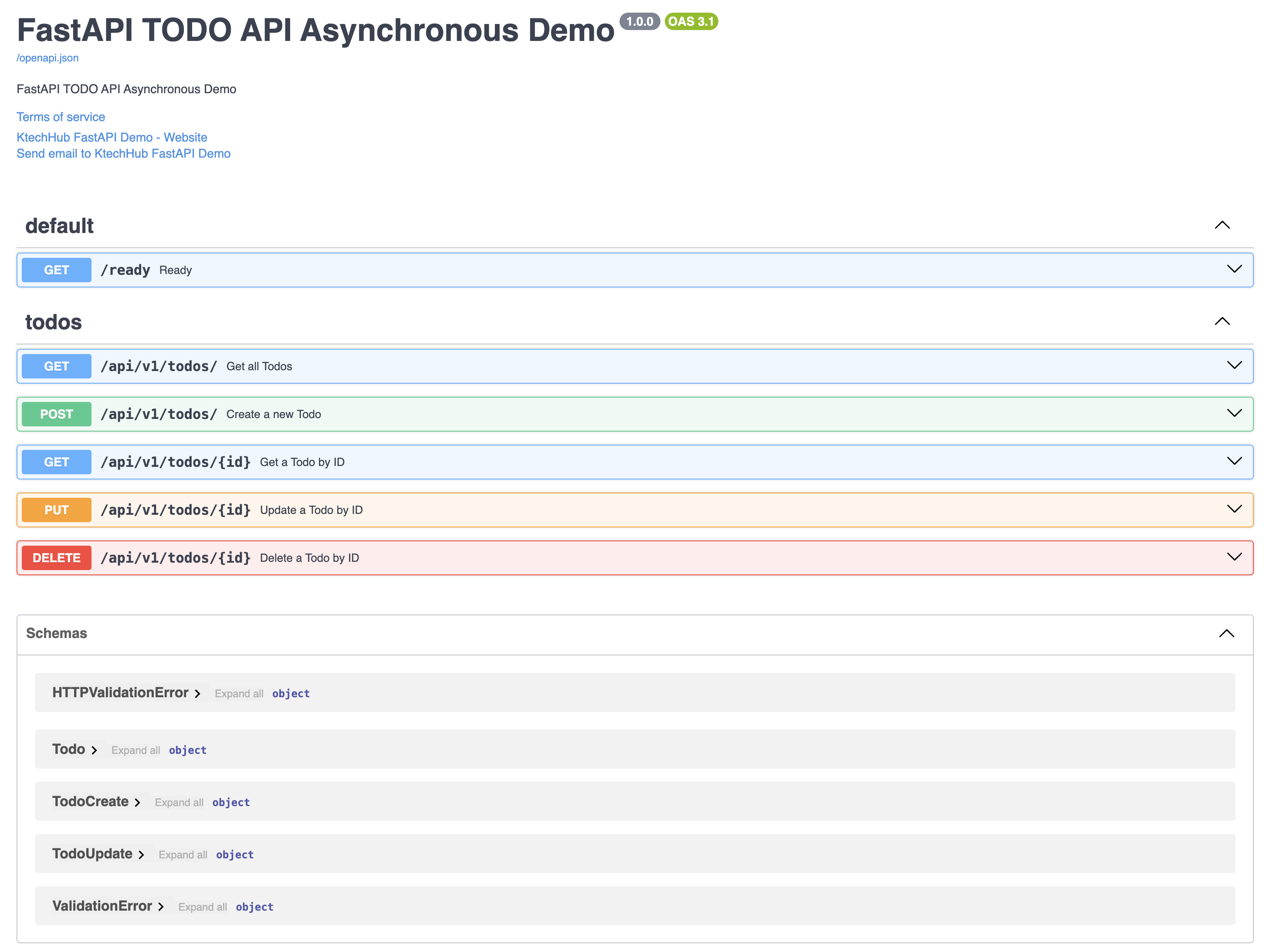
Since I dont want to take a lot of pics, I will just copy the curl command in the swagger execution for each endpoint and paste the result;
# Create a todo:
curl -X 'POST' \
  'http://127.0.0.1:8000/api/v1/todos/' \
  -H 'accept: application/json' \
  -H 'Content-Type: application/json' \
  -d '{
  "title": "string",
  "description": "string",
  "is_completed": false
}'
# Response;
{
  "title": "string",
  "description": "string",
  "is_completed": false,
  "id": 3,
  "views": 0,
  "created_at": "2024-06-23T11:22:33",
  "updated_at": "2024-06-23T11:22:33"
}
# List todos
curl -X 'GET' \
'http://127.0.0.1:8000/api/v1/todos/?skip=0&limit=100' \
-H 'accept: application/json'
# Response;
[
{
"title": "string",
"description": "string",
"is_completed": false,
"id": 3,
"views": 0,
"created_at": "2024-06-23T11:22:33",
"updated_at": "2024-06-23T11:22:33"
}
]# Get a todo by id
curl -X 'GET' \
'http://127.0.0.1:8000/api/v1/todos/3' \
-H 'accept: application/json'
# response
{
"title": "string",
"description": "string",
"is_completed": false,
"id": 3,
"views": 0,
"created_at": "2024-06-23T11:22:33",
"updated_at": "2024-06-23T11:22:33"
}# Update a Todo by ID.
curl -X 'PUT' \
'http://127.0.0.1:8000/api/v1/todos/3' \
-H 'accept: application/json' \
-H 'Content-Type: application/json' \
-d '{
"title": "string",
"description": "string",
"is_completed": true
}'
Response;
{
"title": "string",
"description": "string",
"is_completed": true,
"id": 3,
"views": 0,
"created_at": "2024-06-23T11:22:33",
"updated_at": "2024-06-23T11:26:19"
}# Delete a Todo by ID.
curl -X 'DELETE' \
'http://127.0.0.1:8000/api/v1/todos/3' \
-H 'accept: application/json'
# response;
{
"title": "string",
"description": "string",
"is_completed": true,
"id": 3,
"views": 0,
"created_at": "2024-06-23T11:22:33",
"updated_at": "2024-06-23T11:26:19"
}Conclusion
In this tutorial, we've explored the development of a TODO API using FastAPI and SQLAlchemy, focusing on asynchronous patterns for efficient performance. Here's a brief recap of what we've covered:
-
Setup and Configuration: We began by setting up the project structure and configuring FastAPI with SQLAlchemy for asynchronous database interactions.
-
Database Management: Created an asynchronous database session management module (
database.py) to handle connections and sessions using SQLAlchemy's async capabilities. - Modeling Data: Designed SQLAlchemy models (
BaseModelMixin,Todo) for representing TODO items, incorporating features like timestamps and status tracking. - CRUD Operations: Implemented generic and specific CRUD operations (
CRUDBase,CRUDTodo) to interact with the database asynchronously, ensuring efficient data manipulation and retrieval. - API Development: Developed FastAPI endpoints (
APIRouter) for creating, reading, updating, and deleting TODO items (create_todo,read_todos,read_todo,update_todo,delete_todo). Each endpoint was designed to handle asynchronous requests and responses. - Error Handling and Validation: Implemented error handling using HTTPException to manage responses for cases such as item not found (
404) or invalid requests (400). Input validation was handled using Pydantic schemas.
Conclusion: Throughout this tutorial, we've demonstrated how to leverage FastAPI's asynchronous capabilities along with SQLAlchemy's ORM for building robust and efficient APIs. By following these steps, you've learned how to integrate asynchronous database operations seamlessly into your FastAPI project, ensuring scalability and responsiveness.
By mastering these concepts and patterns, you're well-equipped to extend and adapt this TODO API for more complex applications or integrate additional features in your projects.
Happy coding with FastAPI and SQLAlchemy!
References
GitHub Repo for the code: https://github.com/ktechhub/fastapi_todo_async
Follow Us on:
GitHub: https://github.com/ktechhub
X: https://twitter.com/ktechhub
LinkedIn: https://www.linkedin.com/company/ktechhub

Experienced DevOps Engineer proficient in Python, Docker, Kubernetes, CI/CD, and cloud technologies. Specialized in automating processes and building scalable infrastructure for seamless development and deployment.